<body>
<h1>jQuery 선택자</h1>
<h3>전체 선택자 : *</h3>
<script>
$(function(){
$('*').css('background','green')
});
</script>
<h4>홍길동</h4>
<h5>고길동</h5>
<h6>홍길서</h6>
<script>
$(function(){
$('h4').css('color','orangered')
$('h5,h6').css('background','white')
});
</script>
<h3>클래스 선택자</h3>
<p class="g1">클래스 그룹 1</p>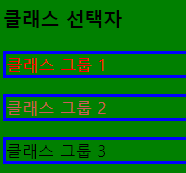
<p class="g1 g2">클래스 그룹 2</p>
<p class="g2">클래스 그룹 3</p>
<script>
$(function(){
$('.g1').css('color','red');
$('.g1.g2').css('color','indianred');
$('.g1, .g2').css('border','3px solid blue')
})
</script>
<h3>아이디 선택자</h3>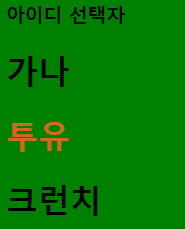
<h1>가나</h1>
<h1 id="choco">투유</h1>
<h1>크런치</h1>
<script>
$(function(){
$('#choco').css('color','chocolate')
})
</script>
<h3>자식 선택자, 후손 선택자</h3>
<ul>
<li>
<h4>후손</h4>
</li>
<li>자손</li>
<ol>
<li>후손11</li>
<li>후손12</li>
<li>후손13</li>
</ol>
<li>자손</li>
<li>자손</li>
<li>자손</li>
<h4>별종</h4>
</ul>
<script>
$(function(){
$('li>h4').css('color','white');
$('ul li').css('background','plum');
});
</script>
<h3>속성 선택자</h3>
<p>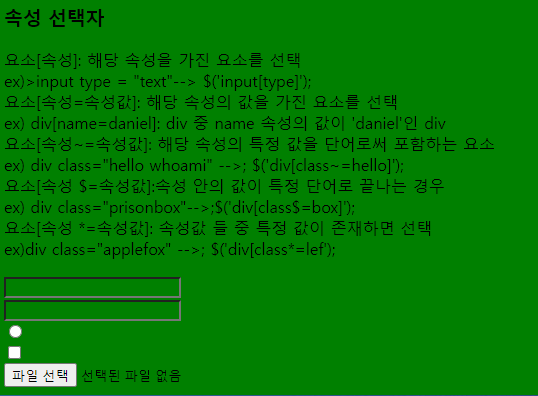
요소[속성]: 해당 속성을 가진 요소를 선택 <br>
ex)>input type = "text"--> $('input[type]'); <br>
요소[속성=속성값]: 해당 속성의 값을 가진 요소를 선택 <br>
ex) div[name=daniel]: div 중 name 속성의 값이 'daniel'인 div <br>
요소[속성~=속성값]: 해당 속성의 특정 값을 단어로써 포함하는 요소 <br>
ex) div class="hello whoami" -->; $('div[class~=hello]'); <br>
요소[속성 $=속성값]:속성 안의 값이 특정 단어로 끝나는 경우 <br>
ex) div class="prisonbox"-->;$('div[class$=box]'); <br>
요소[속성 *=속성값]: 속성값 들 중 특정 값이 존재하면 선택 <br>
ex)div class="applefox" -->; $('div[class*=lef'); <br>
</p>
<input type="text"> <br>
<input type="password" class="test1 test2"> <br>
<input type="radio"><br>
<input type="checkbox" class="test3"> <br>
<input type="file">
</body>
script로 변경
<script>
$(function(){
$('input[type=text]').val('야 곧 점심시간이다!');
$('input[class~=test1]').val(12345);
$('input.test1').val(123456789);
$('input[type*=ad]').attr('checked',true); //checked속성을 넣어준다.
/* $('input[type$=box]').css('width','25px');
$('input[type$=box]').css('height','25px') */
/* $('input[type$=box').css('width','25px')
.css('height','25px');*/
$('input[type$=box]').css({
width:'25px',
height:'25px'
});
})
</script>
'JQUERY > 기초' 카테고리의 다른 글
| 조상, 후손, 동위 선택자 (0) | 2022.08.28 |
|---|---|
| 순서 관련 선택자 (0) | 2022.08.28 |
| 축약형 (0) | 2022.08.28 |