<body>
    <h1>이벤트</h1>
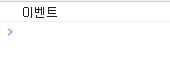
    <button onclick="test1(event);">실행확인</button>
    <script>
        function test1(event){
            //이벤트 내장객체(javascript)
            console.log('이벤트');
        }
    </script>


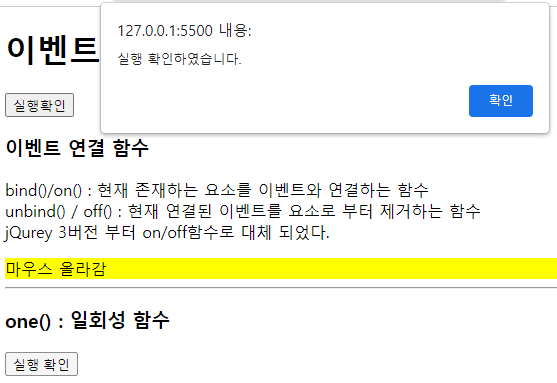
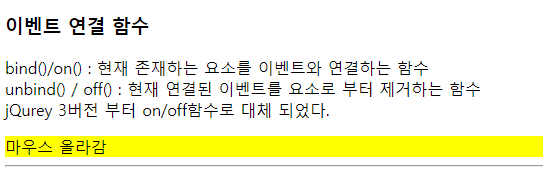
    <h3>이벤트 연결 함수</h3>
    <p>
        bind()/on() :  현재 존재하는 요소를 이벤트와 연결하는 함수 <br>
        unbind() / off() : 현재 연결된 이벤트를 요소로 부터 제거하는 함수 <br>
        jQurey 3버전 부터 on/off함수로 대체 되었다.
    </p>
    <div id="test1">마우스<br>이벤트</div>
   <script>
        //bind/unbind
   /*     $(function(){
            $('#test1').bind('mouseenter',function(){
                $(this).css({
                    background : 'orange'
                });
            }).bind('mouseleave',function(){
                $(this).css({
                    background:'white'
                });
            });
            $('#test1').bind('click',function(){
                $(this).unbind('mouseenter').unbind('mouseleave');
            });
        });

        */
       //on()/off()
       $('#test1').on({
        'mouseenter':function(){
            $(this).css('background','yellow').text('마우스 올라감');
        },
        'mouseleave':function(){
            $(this).css('background','green').text('마우스 떠남');
        },
        'click':function(){
            $(this).off('mouseenter').off('mouseleave');
        }
       });

    </script>
 

   <hr>
    <h3>one() : 일회성 함수</h3>
    <button id="testOne">실행 확인</button>

    <script>
        $('#testOne').one('click',function(){
            alert('실행 확인하였습니다.');
        });
    </script>


'JQUERY > 함수' 카테고리의 다른 글

hover()  (0) 2022.08.28
이벤트..mouseout. mouseover  (0) 2022.08.28
요소 복사,삭제태그들....clone(),remove()  (0) 2022.08.28
요소추가. append, prepend, before, after  (0) 2022.08.28
 <hr>
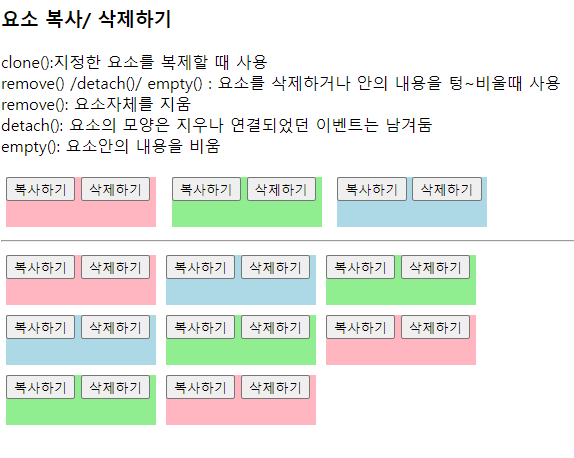
    <h3>요소 복사/ 삭제하기</h3>
    <p>
        clone():지정한 요소를 복제할 때 사용 <br>
        remove() /detach()/ empty() :
        요소를 삭제하거나 안의 내용을 텅~비울때 사용<br>
        remove(): 요소자체를 지움<br>
        detach(): 요소의 모양은 지우나 연결되었던 이벤트는 남겨둠 <br>
        empty(): 요소안의 내용을 비움
    </p>
    <div id="cloneTest">
        <div class="item" id="item1">
            <button class="copy">복사하기</button>
            <button class="delete">삭제하기</button>
        </div>
        <div class="item" id="item2">
            <button class="copy">복사하기</button>
            <button class="delete">삭제하기</button>
        </div>
        <div class="item" id="item3">
            <button class="copy">복사하기</button>
            <button class="delete">삭제하기</button>
        </div>
    </div>
    <hr>
    <div id="result"></div>
    <script>
        $(function(){
            $('.copy').click(function(){
                //clone()/clone(true/false) 둘중 선택/
                //clone()/clone(false): 모양 복사, 연결된 이벤트 기능없음
                $(this).parent().clone(true).appendTo($('#result'));  
                // $(A).appendTo(B) : A -> B 안에 마지막 추가             
            });
            $('.delete').click(function(){
                //empty(), detach(),remove()
                // $(this).empty(); 클릭한 것만 사라지고 부모태그는 그대로임.
              //  $(this).parent().parent().empty(); //복사 전체 삭제된다.
              //$(this).parent().detach();  //임시저장 공간에 남겨둔다
              $(this).parent().remove(); //많이쓴다.
            });
        });
    </script>
 
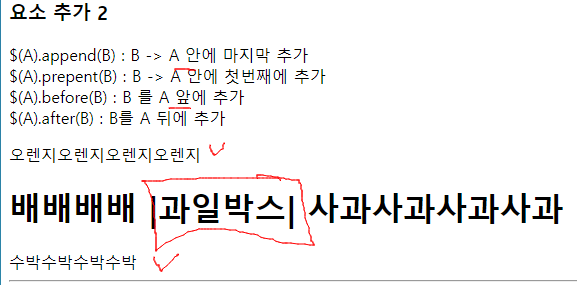
    <h3>요소 추가 2</h3>
    <p>
        $(A).append(B) : B -> A 안에 마지막 추가  <br>
        $(A).prepent(B) : B -> A 안에 첫번째에 추가 <br>
        $(A).before(B) : B 를 A 앞에 추가<br>
        $(A).after(B) : B를 A 뒤에 추가 <br>
    </p>
    <!--h1#test5>laber{|과일박스|}-->
    <h1 id="test5">
        <laber>|과일박스|</laber>
    </h1>
    <script>
        $(function(){
            var interval=setInterval(function(){
                //$('#test5').append('사과');
                //$('#test5').prepend('배');
                //$('#test5').before('오렌지');
                $('#test5').after('수박');
                setTimeout(function(){
                    clearInterval(interval);
                },3000);
            },1000);
        });
    </script>
    <h3>요소 추가 2</h3>
    <p>
        $(A).append(B) : B -> A 안에 마지막 추가  <br>
        $(A).prepent(B) : B -> A 안에 첫번째에 추가 <br>
        $(A).before(B) : B 를 A 앞에 추가<br>
        $(A).after(B) : B를 A 뒤에 추가 <br>
    </p>
    <!--h1#test5>laber{|과일박스|}-->
    <h1 id="test5">
        <laber>|과일박스|</laber>
    </h1>
    <script>
        $(function(){
            var interval=setInterval(function(){
                //$('#test5').append('사과');
                //$('#test5').prepend('배');
                //$('#test5').before('오렌지');
                $('#test5').after('수박');
                setTimeout(function(){
                    clearInterval(interval);
                },3000);
            },1000);
        });
    </script>
<h1>요소(태그)추가 /삭제 함수</h1>
    <p>
        $(A).apppendTo(B) : A -> B 안에 마지막 추가  <br>
        $(A).prepentTo(B) : A -> B 안에 첫번째에 추가 <br>
        $(A).insertBefore(B) : A 를 B 앞에 추가(동위요소) <br>
        $(A).insertAfter(B) : A를 B 뒤에 추가 <br>
    </p>    

    <!--(h1#test$>laber{ - 기준 - })*4-->
    <h1 id="test1">
        <laber> - 기준 - </laber>
    </h1>
    <h1 id="test2">
        <laber> - 기준 - </laber>
    </h1>
    <h1 id="test3">
        <laber> - 기준 - </laber>
    </h1>
    <h1 id="test4">
        <laber> - 기준 - </laber>
    </h1>

    <script>
        $(function(){
            var interval = setInterval(function(){
                $('<laber>appendTo()</laber>').appendTo($('#test1'));  //안.마지막에
               $('<laber>prependTo()</laber>').prependTo($('#test2')); //안.앞에 추가
               $('<label>insertBefore()</label>').insertBefore($('#test3'));//a를b앞
              $('<label>insertAfter()</label>').insertAfter($('#test4'))//a를 b뒤
                setTimeout(function(){
                    clearInterval(interval);
                },2000);
            }, 1000)
        });
    </script>

'JQUERY > 함수' 카테고리의 다른 글

요소추가. append, prepend, before, after  (0) 2022.08.28
text()/ html()  (0) 2022.08.28
each(), addClass(), toggleCalss()  (0) 2022.08.28
<body>
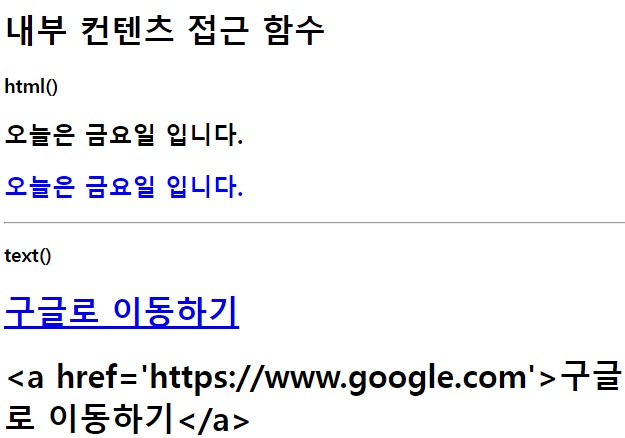
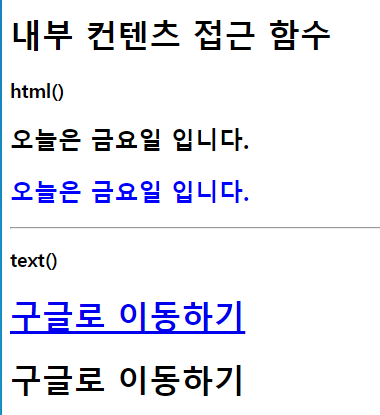
    <h1>내부 컨텐츠 접근 함수</h1>
    <h3>html()</h3>
    <h2 class="test1">
        <b>오늘은 금요일 입니다.</b>
    </h2>
    <h2 class="test2">

    </h2>
    <script>
        //text()/ html()
            //text():  html요소를 배제하고 문자열만 저장하건, 가져오는 함수
            //html(): html요소를 태그로 올바르게 인식하는 함수
        var temp=$('.test1').html();//getter의 역활
        console.log(temp);
        $('.test2').html(temp);  //setter 의 역활
        $('.test2').css('color','blue');
    </script>
    <hr>
    <h3>text()</h3>
    <h1 id="test3">
        <a href="#">구글로 이동하기</a>
    </h1>
    <h1 id="test4">

    </h1>
    <script>
        $(function(){
            var temp=$('#test3').text();//getter의 역할
            console.log(temp);
            $('#test4').text(temp); //setter 의 역할
            //만약 HTML 코드를 문자열로 받는다면?
            var str="<a https://www.google.com'>구글로 이동하기</a>";
            $('#test4').text(str);

        })
     
    </script>

</body>

    <meta charset="UTF-8">
    <title>Document</title>
    <script src="../RESOURCES/asset/js/jquery-3.6.0.min.js"></script>
    <style>
        .high_light_0{background: red; color: white;}
        .high_light_1{background: orange; color: black;}
        .high_light_2{background: green; color: white;}
        .high_light_3{background: blue; color: white;}
        .high_light_4{background: purple; color: white;}
    </style>

</head>
<body>
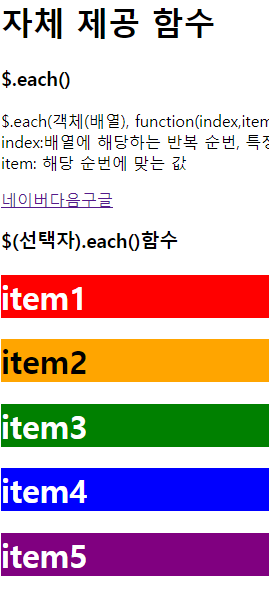
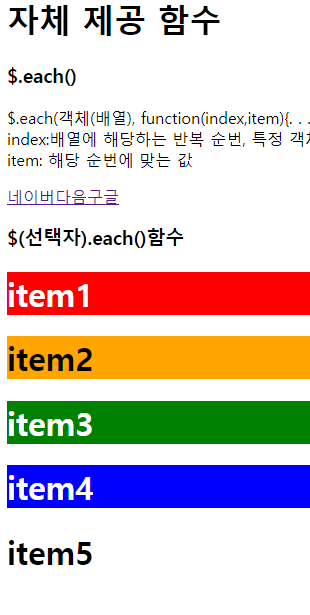
    <h1>자체 제공 함수</h1>
    <h3>$.each()</h3>
    <p>
        $.each(객체(배열), function(index,item){. . .}); <br>
        index:배열에 해당하는 반복 순번, 특정 객체의 경우 해당 객체의 각 키들  <br>
        item: 해당 순번에 맞는 값
    </p>
    <div id="wrap1"></div>
    <script>
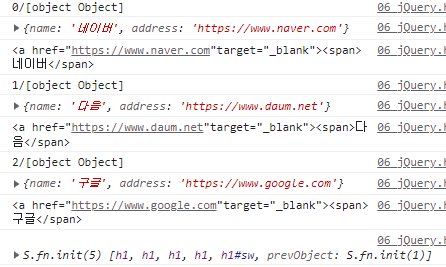
        var arr=[
            {name : '네이버',address : 'https://www.naver.com'},
            {name : '다음', address: 'https://www.daum.net'},
            {name : '구글', address : 'https://www.google.com'}
        ];
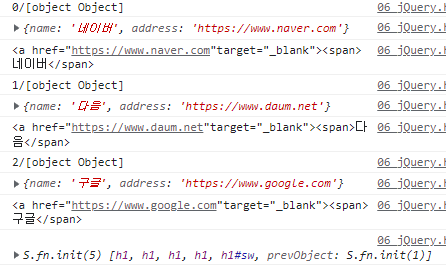
        $.each(arr,function(index,item){
            var outHTML = "";
            console.log(index + "/" + item);
            console.log(item);
            outHTML +='<a href="'+item.address+ '"target="_blank">';
            outHTML +='<span>'+item.name+'</span>';
            console.log(outHTML);
           
            //text()/ html()
            //text():  html요소를 배제하고 문자열만 저장하건, 가져오는 함수
            //html(): html요소를 태그로 올바르게 인식하는 함수

          //  $('#wrap1').text(outHTML);
            $('#wrap1').html($('#wrap1').html()+outHTML);
        });
    </script>

    <h3>$(선택자).each()함수</h3>
    <!--div#wrakp2>h1{item$}*5-->
    <div id="wrap2">
        <h1>item1</hq>
        <h1>item2</hq>
        <h1>item3</hq>
        <h1>item4</hq>
        <h1 id="sw">item5</hq>
    </div>
    <script>
        console.log($('#wrap2').children());
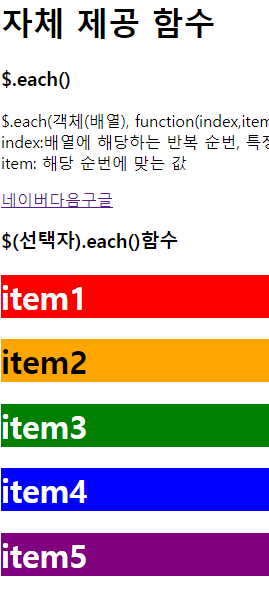
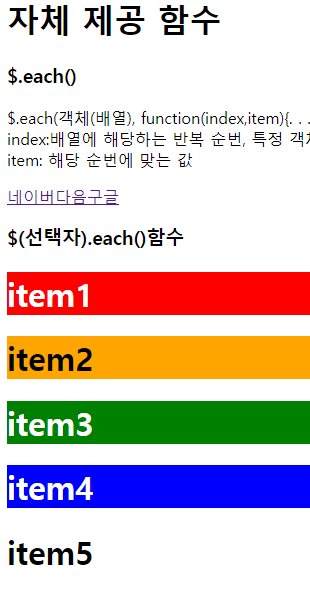
        $('#wrap2 h1').each(function(index,item){
            $(this).addClass('high_light_'+index);
            //addClass()<---> removeClass();
            //선택한 요소에 클래스값을 추가할수 있는 addClass.
        });
        $('#sw').click(function(){
            $(this).toggleClass('high_light_4');
            //toggleClass()로 선택한 요소에 클래스(Class) 값을 넣었다 뺐다 할 수 있습니다.
            //클릭할때 마다 넣다 뺏다 할수 있음
        });
    </script>


</body>


'JQUERY > 함수' 카테고리의 다른 글

요소 추가...appendTo, prepentTo, insertBefore..Afert  (0) 2022.08.28
text()/ html()  (0) 2022.08.28
each(), addClass(), toggleCalss()  (0) 2022.08.28
select option change  (0) 2022.08.28
checkbox 관련  (0) 2022.08.28
    <meta charset="UTF-8">
    <title>Document</title>
    <script src="../RESOURCES/asset/js/jquery-3.6.0.min.js"></script>
    <style>
        .high_light_0{background: red; color: white;}
        .high_light_1{background: orange; color: black;}
        .high_light_2{background: green; color: white;}
        .high_light_3{background: blue; color: white;}
        .high_light_4{background: purple; color: white;}
    </style>

</head>
<body>
    <h1>자체 제공 함수</h1>
    <h3>$.each()</h3>
    <p>
        $.each(객체(배열), function(index,item){. . .}); <br>
        index:배열에 해당하는 반복 순번, 특정 객체의 경우 해당 객체의 각 키들  <br>
        item: 해당 순번에 맞는 값
    </p>
    <div id="wrap1"></div>
    <script>
        var arr=[
            {name : '네이버',address : 'https://www.naver.com'},
            {name : '다음', address: 'https://www.daum.net'},
            {name : '구글', address : 'https://www.google.com'}
        ];
        $.each(arr,function(index,item){
            var outHTML = "";
            console.log(index + "/" + item);
            console.log(item);
            outHTML +='<a href="'+item.address+ '"target="_blank">';
            outHTML +='<span>'+item.name+'</span>';
            console.log(outHTML);
           
            //text()/ html()
            //text():  html요소를 배제하고 문자열만 저장하건, 가져오는 함수
            //html(): html요소를 태그로 올바르게 인식하는 함수

          //  $('#wrap1').text(outHTML);
            $('#wrap1').html($('#wrap1').html()+outHTML);
        });
    </script>

    <h3>$(선택자).each()함수</h3>
    <!--div#wrakp2>h1{item$}*5-->
    <div id="wrap2">
        <h1>item1</hq>
        <h1>item2</hq>
        <h1>item3</hq>
        <h1>item4</hq>
        <h1 id="sw">item5</hq>
    </div>
    <script>
        console.log($('#wrap2').children());
        $('#wrap2 h1').each(function(index,item){
            $(this).addClass('high_light_'+index);
            //addClass()<---> removeClass();
            //선택한 요소에 클래스값을 추가할수 있는 addClass.
        });
        $('#sw').click(function(){
            $(this).toggleClass('high_light_4');
            //toggleClass()로 선택한 요소에 클래스(Class) 값을 넣었다 뺐다 할 수 있습니다.
            //클릭할때 마다 넣다 뺏다 할수 있음
        });
    </script>


</body>


'JQUERY > 함수' 카테고리의 다른 글

text()/ html()  (0) 2022.08.28
each(), addClass(), toggleCalss()  (0) 2022.08.28
select option change  (0) 2022.08.28
checkbox 관련  (0) 2022.08.28
css, val, attr, mouseenter 이벤트까지.  (0) 2022.08.28

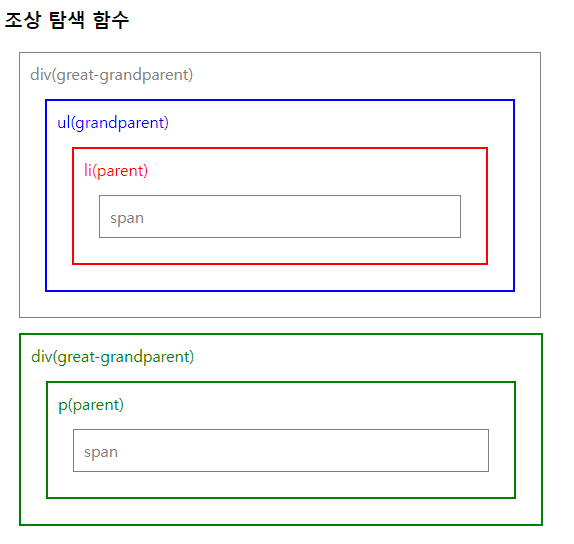
    <h3>조상 탐색 함수</h3>
    <div class="wrap1">
        <div style="width:500px;"> div(great-grandparent)
            <ul> ul(grandparent)
                <li> li(parent)
                    <span> span </span>
                </li>
            </ul>
        </div>
       
        <div style="width:500px"> div(great-grandparent)
            <p> p(parent)
                <span>span</span>
            </p>
           
        </div>
    </div>
   <script>
        $('span:eq(0)').parent().css({
            color:'red',
            border:'2px solid red'        
        });
        //$('span:eq(0)').parent().praret().parent()
        $('span:eq(0)').parents('ul').css({
             //ul->div로 표기하면 div 2개가 파란색이됨.
             //미기재하면 전체 부모가 모두 변경됨.
            color:'blue',
            border : '2px solid blue'            
        });

        $('span:eq(1)').parentsUntil('.wrap1').css({  //모든 부모모
            color:'green',
            border:'2px solid green'
        })

---------------------------------------------------------------------------

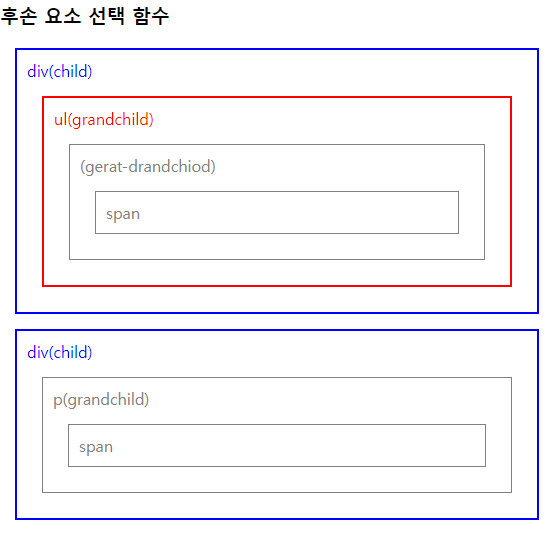
 <h3>후손 요소 선택 함수</h3>
    div.wrap2>div[style="width 500px;"] ch.div(chind)
    <div  class="wrap2">
        <div style="width:500px"> div(child)
            <ul> ul(grandchild)
                <li>(gerat-drandchiod)
                    <span>
                        span
                    </span>
                </li>
            </ul>
        </div>
        <div style="width:500px;"> div(child)
         <p> p(grandchild)  
            <span>
                span
            </span>
        </p>

    </div>
    </div>
    <script>
        $('.wrap2').children().css({
            //children()한번더 기재하면 자식자식
            color : 'blue',
            border : '2px solid blue'
        });
    </script>
    <script>
        $('.wrap2').find('ul').css({
            //특정자식찾기가 가능해짐  //자식은 너무 많아서 find로 직접 찾기
            color:'red',
            border : '2px solid red'
        });
     </script>
 
///////////////////////////////////////////////////////////////////////////////////////////
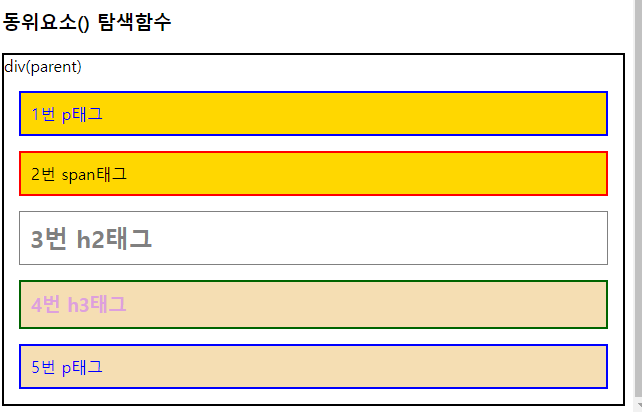
    <h3>동위요소() 탐색함수</h3>
    <!--div.wrap3[style='border:2px solid black;']>(p+span+h2+h3+p)-->
    <div class="wrap3" style="border:2px solid black;">
        div(parent)
        <p>1번 p태그</p>
        <span>2번 span태그</span>
        <h2>3번 h2태그</h2>
        <h3>4번 h3태그</h3>
        <p>5번 p태그</p>
    </div>
    <script>
        // side 옆에있는
        $('h2').siblings().css({
            color:'red',
            border :'2px solid red'
        });
        $('h2').siblings('p').css({
            color:'blue',
            border :'2px solid blue'
        });
        // prev 앞에
        $('h2').prev().css({
            background:'lightblue'
        });
        $('h2').prevAll().css({
            background : 'gold'
        });
        $('h2').prevUntil('p').css('color','black');
        // next 다음에
        $('h2').next().css({
            color:'plum',
            border:'2px solid plum'
        });
        $('h2').nextAll().css('background', 'wheat');
        $('h2').nextUntil('p').css('border','2px solid darkgreen');
    </script>

'JQUERY > 기초' 카테고리의 다른 글

순서 관련 선택자  (0) 2022.08.28
선택자, CSS, VAL, ATTR  (0) 2022.08.28
축약형  (0) 2022.08.28
<h3>순서 관련 선택자</h3>
    <table border="1">
        <tr>
            <th>이름</th>
            <th>나이</th>
            <th>주소</th>
        </tr>
        <tr>
            <td>홍길동</td>
            <td>5</td>
            <td>강남구</td>
        </tr>
        <tr>
            <td>홍길소</td>
            <td>10</td>
            <td>인천</td>            
        </tr>
        <tr>
            <td>홍길남</td>
            <td>15</td>
            <td>부산</td>
        </tr>
        <tr>
            <td>홍길북</tb>
            <td>20</tb>
            <td>대전</tb>            
        </tr>
        <tr>
            <td>고길동</td>
            <td>25</td>
            <td>서울</td>
        </tr>

        <script>
            $('tr:first').css('background','yellow');
            $('tr:last').css('background','lawngreen');
            $('tr:odd').css('background','cyan');   //홀수 인덱스
            $('tr:even').css('background','wheat');  //짝수 인덱스

            $('table tr:eq(3)').css('color','red');
            $('table tr:nth-child(2n+1)').css('color','yellow')  
            //ntn-child(n)은 부모 안의 모든 요소중 n번째 요소
            //n은 0,1,2,3~~정수를 의미// 5n은 5의 곱하기로 보면 되고 n+5은 5번째 이후 모든 요소로 보면됨.
            //an+b== a증감수, b는 오프셋, n은 정수///3n+1...n=0이면 1....1이면 4, 2이면 7....1부터 3번째마다 선택됨
            //ntn-child(2n+1)은 첫번째 요소로부터 2번째 마다 선택

        </script>


    </table>

'JQUERY > 기초' 카테고리의 다른 글

조상, 후손, 동위 선택자  (0) 2022.08.28
선택자, CSS, VAL, ATTR  (0) 2022.08.28
축약형  (0) 2022.08.28

+ Recent posts